Uploading Images To The Forum
Posted: Wed 27 Dec, 2006 12:44 pm
The forum now has a facility to enable images to be added when posting a message.
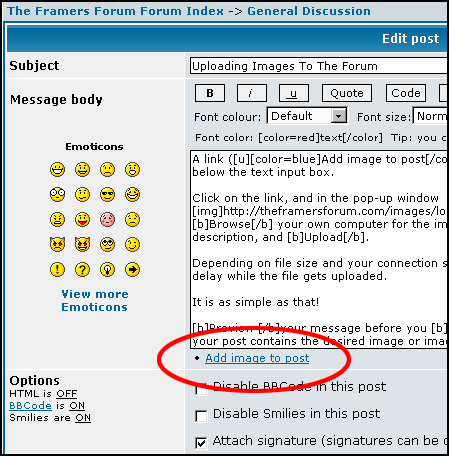
A link (Add image to post) is now provided below the text input box.
Click on the link, and this window pops up
Browse your own computer for the image, optionally enter a description, and Upload.
Depending on file size and your connection speed, there will be some delay while the file gets uploaded.
It is as simple as that!
Preview your message before you submit to ensure that your post contains the desired image or images.
A link (Add image to post) is now provided below the text input box.
Click on the link, and this window pops up
Browse your own computer for the image, optionally enter a description, and Upload.
Depending on file size and your connection speed, there will be some delay while the file gets uploaded.
It is as simple as that!
Preview your message before you submit to ensure that your post contains the desired image or images.